Who this is for
Households with short, repeated outages that want a compact 1-kWh battery that refills quickly.
Skip if
Anyone that might want to add capacity later, needs a built-in light, or needs quiet fast charging — the fan gets loud under fast charging and heavy load, per OutdoorGearLab and MacRumors.
Preparedness Gear
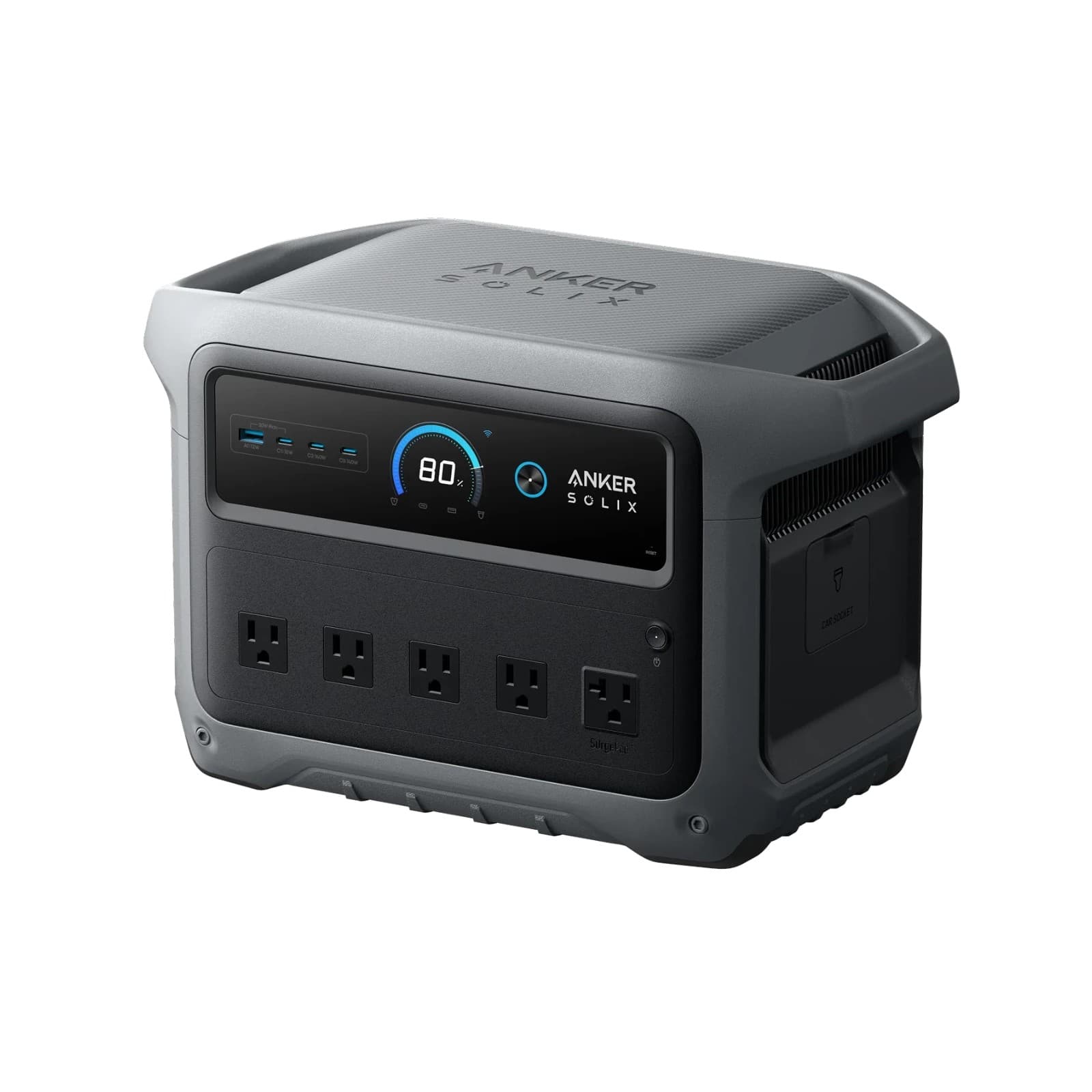
Anker SOLIX C1000 Gen 2 Portable Power Station
Evaluated for household use · Affiliate links disclosed
The faster-charging Anker 1-kWh pick that can't grow
Why we chose it
It's the newer Anker 1-kWh model: a 49-minute rated recharge, 2,000W output and a 10 ms UPS switchover in a 24.9-pound body, traded against the built-in light and expansion the original C1000 had.
Buy From
AnkerAlso available at
Affiliate links · We earn a small commission at no cost to you. How this works
We evaluate every pick for real-world reliability.
Why this matters
Why this matters in an emergency
A 1-kWh power station is a size most households can live with: light enough to carry, and big enough to keep the basics going, like a router, phones and lights. What separates one from another is how fast it refills, what it can't do, and what it's like to run. The C1000 Gen 2 is Anker's answer to the first question and its trade on the other two.
How We Evaluated
How we evaluated this
We researched the C1000 Gen 2 the way we'd size one up before buying it for our own house: Anker's user guide, product pages and warranty page for what the unit is, and independent testing and owner reports for how it behaves. OutdoorGearLab's instrumented review and MacRumors' review give the measured charge times, usable energy and fan behavior.
We don't have hands-on time with this unit yet, so every figure here is attributed to Anker, a named tester or an owner. Where Anker's numbers and the testers' differ, or where Anker's own pages disagree with each other, we tell you both.
Our pick: Anker SOLIX C1000 Gen 2 Portable Power Station
The verdict
If your outages come and go — power back for an hour, then gone again — the C1000 Gen 2's one real advantage is speed. Anker rates a full wall recharge at 49 minutes, and OutdoorGearLab timed 49 minutes in Anker's UltraFast mode and 56 in standard mode. It puts 2,000 watts behind five outlets from a 1,024Wh pack, and OutdoorGearLab measured about 890Wh actually coming out. It's a trade. Next to the original C1000, the Gen 2 gives up the built-in light and any option to add an expansion battery. The fast mode is conditional, and the fan gets loud when it's charging hard. It's also a recent unit, so there's no long-term reliability record yet. One caveat before you buy: Anker's own pages disagree on surge power — 2,400W in the user guide, 3,000W peak on the product page — so size your biggest startup load against the lower number.
- Fast wall recharge: 49 minutes rated, 49 measured in UltraFast mode
- About 890Wh measured at the outlets, 87% of the label
- 2,000W output and a 10 ms UPS switchover
- 24.9 lb, with an LCD screen and app control
- No expansion battery, and no built-in light
- The fan gets loud under fast charging and heavy load
- UltraFast needs a warm battery and turns itself off when you unplug
- Anker's own pages disagree on surge power
What it does well
Recharge speed. Anker rates 49 minutes from empty to full over the wall, using the app's UltraFast mode at up to 1,600 watts. OutdoorGearLab measured 49 minutes in that mode and 56 in standard mode. If your power keeps cutting in and out, that's the feature that matters most.
What it does poorly
It can't grow. Anker says the Gen 2 has no expansion feature, and its BP1000 expansion battery isn't compatible. The original C1000 does take that battery. It also dropped the built-in light the original had, per OutdoorGearLab and How-To Geek. And the fan gets loud under fast charging and heavy load; MacRumors' reviewer said they couldn't sleep with the fans at full speed.
Where it shines
Short, repeated outages. You plug it in the minute the power's back, and it's ready again in under an hour. It's also a compact 24.9 pounds by Anker's figure (25.2 on OutdoorGearLab's scale).
Where it frustrates
Don't count on the 49-minute figure every time. Anker says UltraFast needs a battery above 68°F, turns itself off whenever you unplug the charging cable, and has to be switched on in the app. Don't count on adding capacity later, either. And plan your runtime around the measured 890Wh, not the 1,024Wh on the label.
Gen 2 or the original C1000?
They're different units. The Gen 2 is faster to charge and puts out more power (2,000W against 1,800W), and Anker lists a quicker 10 ms switchover for UPS mode. The original holds a little more (1,056Wh), keeps the built-in light, and can be expanded. Pick the Gen 2 for speed, the original if you might want a second battery.
What owners report
What reviewers report so far. The reports are mostly good, and they cluster around a few things you can plan for. We couldn't read the lowest-rated owner reviews when we researched this, so we make no claim about how often units fail.
The fan. OutdoorGearLab says the fan gets "frustratingly loud" near maximum wattage. MacRumors says the fans are loud at full charging load and nearly silent on small devices. Neither gave a decibel reading. If it will sit in your bedroom or living room, don't run fast charging overnight.
Fast charging has conditions. This one comes from Anker's own pages, not an owner complaint. UltraFast needs a warm battery (above 68°F), has to be turned on in the app, and turns itself off each time you unplug the charging cable. Anker says it charges normally and protects the battery best at standard speed.
Shutoffs you might not expect. Per Anker's guide, the USB ports turn off by themselves when a device draws under 1W for a long time, and the unit's default standby time is 12 hours. Set it up at home, not on your first outage night.
App and firmware. MacRumors reported a firmware update failing during its testing. That's one reviewer's experience, not a pattern we can size.
Crowded outlets. MacRumors and thesolarlab both note that big plugs and power bricks crowd the neighboring outlets. Bring a short extension cord.
Solar in dim light. One owner with about nine months of use says the solar input clicks on and off in low light, noticeably enough to be distracting in the same room.
Long-term reliability. We found no multi-year owner reports; the first reviews are from late 2025. That is an absence of data, not proof it's reliable. We'll update this as owner reports build up.
Other options to consider
EcoFlow DELTA 3 Classic
Our main 1-kWh pick, and the closest rival. Both are fixed-size units, so compare charging speed, outlets, weight and warranty side by side.
Read full review →Anker SOLIX C1000
The original, from the same Anker family. It holds a little more (1,056Wh), keeps the built-in light and can take Anker's BP1000 expansion battery, which the Gen 2 can't. Anker rates its wall recharge at 58 minutes against the Gen 2's 49.
Read full review →Jackery Explorer 1000 v2
A similar-size LFP station that's about a pound lighter by the makers' figures (23.8 lb, per Jackery). Compare outlets and charging speed before you choose.
Read full review →BLUETTI AC180
A bit more capacity (1,152Wh) from our reviewed LFP primary, with its own standby battery-backup mode. Compare outlets, weight and charging speed before you choose.
Read full review →
Longevity
How long will this actually last
Anker rates the battery for 4,000 cycles to at least 80% of its capacity, and backs the unit with a 5-year warranty that you activate by registering it. The warranty only holds in the country where you bought it.
To keep it ready, follow Anker's own storage advice: keep it dry and cool, and top it up to 100% at least once every three months if it's sitting unused. Anker warns that a unit left low for a long time can discharge until it stops working. We found no water or dust rating stated by Anker, so keep it dry. The charging range is 32°F to 104°F, so don't count on charging it in a freezing garage.
Questions people actually ask
How fast does it really recharge?
Can I add a second battery later?
Does it have a built-in light?
What is its real surge power?
How loud is it?
Why did my USB device stop charging?
Technical Specifications
| Capacity | 1,024Wh rated; about 890Wh measured at the outlets (Anker; OutdoorGearLab) |
| AC Output | 2,000W (Anker); surge 2,400W per Anker's user guide, 3,000W peak on Anker's product page |
| AC Outlets | 5 (Anker lists 10 ports in all; MacRumors counts 5; OutdoorGearLab counted 6) |
| USB And Car | 2 USB-C at 140W, 1 USB-C at 15W, 1 USB-A at 12W, 12V car socket (Anker) |
| Wall Recharge | 49 min rated with UltraFast (Anker); 49 min UltraFast / 56 min standard measured (OutdoorGearLab) |
| Max AC Input | 1,200W standard, 1,600W UltraFast (Anker) |
| Solar Input | Up to 600W, 11-60V (Anker) |
| UPS Switchover | 10 ms (Anker) |
| Cycle Life | 4,000 cycles to at least 80% (Anker) |
| Weight | 24.9 lb (Anker); 25.2 lb on OutdoorGearLab's scale |
| Temperature | Discharge -4 to 104°F; charge 32 to 104°F (Anker) |
| Expansion | None (Anker) |
| Warranty | 5 years once registered; valid in the country of purchase (Anker) |
Sources we consulted
- Anker — SOLIX C1000 Gen 2 product page
- Anker — SOLIX C1000 Gen 2 user guide (A1763)
- Anker — warranty registration
- Anker — BP1000 expansion battery page
- OutdoorGearLab — Anker SOLIX C1000 Gen 2 review
- MacRumors — Anker SOLIX C1000 Gen 2 review
- How-To Geek — Anker SOLIX C1000 Gen 2 review
- thesolarlab — Anker SOLIX C1000 Gen 2 review
- Anker SOLIX C1000 Gen 2 on Amazon (sold by AnkerDirect) and its owner reviews
We may earn a commission when you buy through links on this page. How this works
Preparedness Gear
Anker SOLIX C1000 Gen 2 Portable Power Station
Evaluated for household use · Affiliate links disclosed
The faster-charging Anker 1-kWh pick that can't grow
Why we chose it
It's the newer Anker 1-kWh model: a 49-minute rated recharge, 2,000W output and a 10 ms UPS switchover in a 24.9-pound body, traded against the built-in light and expansion the original C1000 had.
Buy From
AnkerAlso available at
Affiliate links · We earn a small commission at no cost to you. How this works
We evaluate every pick for real-world reliability.